Try our toolbar

toolbar powered by Conduit

Search This Blog

Photobucket

Monday, May 17, 2010

Wealth Bulletin’s Top 10 most expensive streets in the world

Avenue Princess Grace Monaco Top 10 most expensive streets in the world 2008The Wealth Bulletin (a Dow Jones site) has come up with a list of the 10 most expensive streets in the world. The survey revealed that the prices for the top homes in the best locations appear to have decoupled from the gloom and doom being felt in the wider property market.
If you want to live in the best accommodation in these streets you will need to be a billionaire, or not far behind !
Avenue Princess Grace in Monaco has been named at the top with a price tag of $190,000 per square metre. It is followed by Hong Kong’s Severn Road with a price of $121,000 per square metre (sq mt) at second and New York City’s Fifth Avenue at third place ($80,000 per sq mt).
Here is the complete list, with some sample property prices as tallied by Wealth Bulletin:

1. Avenue Princess Grace, Monaco — $17,750 per square foot - $190,000 per sq mt
Avenue Princess Grace Monaco 2 Top 10 most expensive streets in the world 2008Named after the iconic Hollywood star Grace Kelly, who was married to Rainier III, Prince of Monaco.
Forget buying a house there. Properties on the avenue change hands for up to $41m – and many of them are fairly modest four-bedroom apartments. And at that price you will get a view of the Mediterranean, but not much else
(Just getting a beer at Jimmy’s Bar on the Avenue will set you back more than $100)
2. Severn Road, Hong Kong — $11,200 per square foot - $121,000 per sq mt
hong+kong victoria peak Top 10 most expensive streets in the world 2008Hong Kong’s Severn Road is located in the city’s most exclusive district, The Peak, at the top of Hong Kong Island. Some of the most spectacular urban views in the world, overlooking the city’s skyscrapers and across Hong Kong harbour to Kowloon.
3. Fifth Avenue, New York City — $7,500 per square foot - $80,000 per sq mt
 Top 10 most expensive streets in the world 2008Fifth Avenue has the most iconic status of all the streets on the list : it runs from Washington Square to Harlem and divides Manhattan’s East/West streets. It is representative of New York’s upper crust, having been rated as the most expensive shopping street in the world..
Fifth Avenue New York City Top 10 most expensive streets in the world 20084. Kensington Palace Gardens, London — $7,196 per square foot - $77,000 per sq mt
Kensington Palace Gardens London Top 10 most expensive streets in the world 2008Often referred to as “Billionaires Row”. Houses on this street might sell for some of the highest prices in the world, but the more generous supply of space means you get more square metres for your money than in Monaco and Hong Kong
5. Avenue Montaigne, Paris — $5,046 per square foot - $54,000 per sq mt
avenue montaigne Top 10 most expensive streets in the world 2008Avenue Montaigne, in Paris’ 8th arrondisement and near the Champs-Elysees, has superseded Avenue George V as the capital’s most expensive.
6. Ostozhenka, Moscow — $3,738 per square foot - $40,000 per sq mt
7. Via Suvretta, St. Moritz — $3,551 per square foot - $38,000 per sq mt
8. Carolwood Drive, Beverly Hills — $2,803 per square foot - $30,000 per sq mt
9. Wolseley Road, Sydney — $2,616 per square foot - $28,000 per sq mt
10. Altamount Road, Mumbai — $2,336 per square foot - $25,000 per sq mt

Thursday, March 18, 2010

Just fill-up a form, download MediaRing Talk and start enjoying free phone calls


I've been using MediaRing Talk to make FREE international and long distance calls around the world. I thought you'd find it useful. Here's an invite to sign up.


Free PC to phone calls with MediaRing Talk

Free PC to phone calls with MediaRing Talk

MediaRing Talk allows you to make free PC to PC calls worldwide. It is very easy to use, absolutely no charges and above all unlimited! All the time you will experience outstanding audio quality irrespective of whom and where you are calling.


Internet phone calls from your mobile device with MediaRing Talk

MediaRing Talk for Mobile lets you enjoy free mobile-to-mobile calls to and from anywhere in the world. Paying no roaming charges, you can stay in touch with friends, family or even business associates while on the move and not worry about incurring expensive IDD charges.


VoIP phone calls with MediaRing TalkComing soon: Desktop phone for Mediaring Talk.
Lets you use all the great features of Mediaring Talk without a PC.


By: MediaRing Ltd

Wednesday, March 10, 2010

All about the Apple iPad (FAQ)

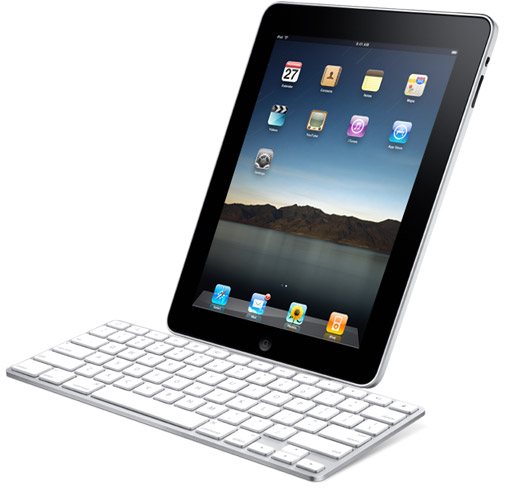
Apple iPad (Credit: James Martin/CNET)

Apple finally gave us the date the first iPads will hit store shelves: April 3. We've been closely following the touch-screen tablet since Apple first announced it in late January, but here's a quick guide for your most essential questions about the device.

First things first: How big is it?
The iPad's screen offers a maximum resolution of 1,024x768 pixels and measures 9.7 inches diagonally, 5.75 inches wide, and 7.75 inches tall. An 0.86-inch bezel frames the screen (with a hair extra room on the bottom to account for the home button), making the front of the iPad a total of 7.47 inches wide and 9.56 inches tall. The total thickness of the iPad is half an inch at its thickest point, which tapers down to a quarter of an inch near the edges. Total weight is 1.5 pounds for the model with Wi-Fi only, or 1.6 pounds for the version with 3G.

What hardware features does the iPad offer? Many of the iPad's hardware capabilities are identical to the Apple iPod Touch, including Wi-Fi, Bluetooth 2.1, a stereo audio output (headphone jack), built-in speaker, an integrated lithium ion rechargeable battery, and NAND flash memory. A built-in accelerometer and ambient light sensor are also included on the iPad.

Hardware features that distinguish the iPad from the iPod Touch include a 1GHz A4 processor, an oleophobic screen coating, integrated digital compass, built-in microphone, mute switch, and support for 802.11n Wi-Fi (in addition to 802.11b/g). The 3G version of the iPad includes a SIM card tray, as well as assisted GPS capabilities.

What's the deal with the wireless plan?
Apple and AT&T are offering a pretty good deal on 3G service for the iPad. There are two options: $15 a month for 250MB of data, or unlimited data for $29.99 a month. The bonus is that you don't have to sign any contracts that bind you to the device for two years. Each option can be prepaid for a month in advance. Again, you need the iPad 3G model, which bumps up the baseline price of the device to $629 (16GB), $729 (32GB), and $829 (64GB).

If I already have apps for my iPhone or iPod Touch, can I use them on the iPad?
In most cases, the answer should be yes. Older or existing apps can run on the iPad at their native iPod/iPhone resolution (taking up a small portion of the iPad screen) or used in a full-screen mode that artificially doubles the resolution. So long as the apps are in your iTunes library when you connect the iPad to your computer, most should transfer with no problem. There are exceptions, of course. Apps designed to take advantage of unique hardware characteristics of the iPhone (such as the photo camera or video recording) may not transfer, and would be useless on the iPad anyway.

That said, many popular apps for the iPhone and iPod Touch will likely be offered in a new iPad-specific version that makes better use of the device's larger screen. These apps, designed specifically for the iPad, will not be backward-compatible with the iPhone and iPod Touch.

I've heard the iPad is basically just an oversize iPod Touch. Is that true?
In some ways, it is a supersized version of Apple's touch-screen iPod: same basic look and functionality with its multitouch screen and reliance on iTunes and the App Store to install applications and download media. But there are plenty of differences.

The operating system is a version of the iPhone OS, but with a slightly different look and feel. Many of the same apps are there--e-mail, photos, notes, an iPod, calendar, contacts, maps, YouTube, and Safari--but have been tweaked to take advantage of the iPad's larger screen size.

The 9.7-inch screen offers far more screen real estate and also makes the iPad much more realistic to use an e-reader. That brings us to iBooks, the e-bookstore Apple created specifically for the iPad. It's an app that features a virtual bookshelf with content from five major publishers: HarperCollins, Hachette, Penguin, Macmillan, and Simon & Shuster. The iBooks store will feature both popular books as well as textbooks. Readers can choose to read in portrait or landscape mode and change the size of the text.

But that's not the only iPad-only software Apple has cooked up. The company had its engineers completely rework iWorks for the device, including Pages (word processing), Numbers (spreadsheets), and Keynote (presentations). Each iWorks app will be sold separately for $9.99.

There are accessories that will cause some major iPhone/iPod envy as well, like the keyboard dock accessory. There's also a camera connection kit that lets users import images from their SD cards, and a charging/docking accessory, that when used in conjunction with the photo app's montage mode turns the iPad into an electronic picture frame.

What else might I need to use the iPad?
While the iPad can be used without a computer for the majority of its features, you will need to connect to a computer running Apple's iTunes 9.0 or later to initially set up the device. Computer specification requirements for iTunes 9.0 can be found on Apple's Web site.

If you plan on using the iPad at home for surfing the Web, and you do not have a 3G-capable model, you will need to make sure your home is set up for wireless Internet. A power adapter is included with all iPads, but users should consider investing in a charging dock if they wish to take advantage of the iPad as a photo frame. Users who anticipate using the iPad heavily as a word processor may want to consider buying Apple's keyboard dock or a compatible Bluetooth wireless keyboard.

What's missing from the iPad that I might find in a competing product?
The iPad is in many ways one of the first products of its kind--making it hard to draw easy comparisons. When weighed against high-end smartphones, users should know that the iPad is not designed for voice calls or text messages (though there are apps that can work around this limitation). More importantly, the iPad does not include a built-in camera for taking photos or videos.

When compared to low-end laptops and Netbooks, the iPad can't run common full-fledged applications (such as Microsoft Word), or use multiple apps simultaneously. Conventional input and output ports, such as USB, SD, VGA, and LAN are also missing, though some adapters exist to address this. Critics routinely point out that the iPad does not support Adobe's Flash media format, which is required to view content on many popular Web sites. Lack of an integrated hardware keyboard or high-resolution video output are also common complaints from the laptop perspective.

Finally, compared against dedicated e-readers (such as the Amazon Kindle and Barnes & Noble Nook), the iPad's reflective glass front and backlit color LCD screen arguably strain the eyes more than a passively illuminated non-glare e-ink display.

When and where can I buy it, and how much is this going to set me back?
There are two versions of the iPad. Apple announced Friday that the Wi-Fi version will launch in the U.S. on April 3, followed by the Wi-Fi and 3G-capable edition later in the month. Both versions will hit Australia, Canada, France, Germany, Italy, Japan, Spain, Switzerland, and the U.K. in late April.

The price depends on your 3G needs and how much storage you require. The iPad's Wi-Fi-only version will start at $499 for 16GB of memory, $599 for 32GB, and $699 for 64GB. The Wi-Fi + 3G edition will cost $629 for 16GB, $729 for 32GB, and $829 for 64GB.

You can preorder both versions starting March 12, and you can order it for delivery from Apple.com or reserve a Wi-Fi version to pick up on April 3 at any Apple retail store. Apple has also said it will make the iPad available at Best Buy, but hasn't disclosed details on when that will be.

South Africa World Cup 2010


The logo for the 2010 FIFA World Cup – the event’s trade mark – was revealed in 2006 and led to mixed reactions. While some people thought the world cup logo was the best thing since a slice of bread, others shrugged. However, over the past years the 2010 FIFA World Cup Emblem has slowly but surely embedded itself into South African society.

The logo was designed by South African graphic designer Gaby de Abreu, co-founder of the Johannesburg based design company Switch Design which also designed logos for South Africa’s Springbok rugby team, the African Nations Cup soccer event and the Olympic Torch Relay that travelled through South Africa. De Abreu worked six months on the emblem before it was unveiled in Berlin in July 2006.

The search for a logo designer started in 2005, and resulted in 25 shortlisted companies. Of them, five were asked to submit five designs. The designs had to reflect FIFA, the World cup football and the African continent.

The potential 2010 world cup logos were then presented to a panel of judges from South Africa and other African countries, as well as FIFA delegates. In the end it was De Abreu’s logo that won overall approval. According to him, it was the strong African identity of his logo that appealed to the judges.

To compare the 2010 world cup logo with previous world cup logos, please click here. For the rules on using the 2010 world cup logo and the other FIFA trade marks, click here.

More interesting 2010 world cup stuff on Twenty10:


South Africa 2010 World Cup Groups


The World Cup is a global event. Every nation on earth watches, and talks about. Even if your nation isn’t one of the lucky 32 that gets to compete, you’re still oddly involved (speaking from personal experience there, unfortunately). Even non-football fans watch. Which is insane when you think about it.

But not everyone speaks English, so not everyone calls this tournament the World Cup. In French it’s the Coupe du Monde. In German the Weltmeisterschaft. In Spanish the Copa do Mundo La Copa Mundial and in Italian the Coppa del Mondo Il Mondiale. And in Hindi it’s विश्व कप, which I have no idea how to pronounce.

Below is a list of every translation I could find, from Afrikaans to Hebrew to Welsh…

Afrikaans: Wêreldbeker
Arabic: كأس العالم
Belarusian: Кубак свету
Bulgarian: Световно първенство
Catalan: Copa del Món
Chinese: 世界杯
Czech: Světový pohár
Danish: Verdenmesterskab (or VM for short)
Dutch: Wereldkampioenschap voetbal
Finnish: Maailmancup
Flemish: Weireldkampioenschap sjotten
French: Coupe du Monde
Galician: Campionato do Mundo
German: Weltmeisterschaft (or WM for short)
Greek: Παγκόσμιο Κύπελλο
Hebrew: גביע העולם
Hindi: विश्व कप
Hungarian: Világ Kupa
Icelandic: Heimsmeistarakeppnin
Indonesian: Piala Dunia
Irish: Corn an Domhain
Italian: Coppa del Mondo Il Mondiale
Japanese: W杯
Korean: 세계 축구
Lithuanian: Pasaulio čempionatas
Macedonian: Светско првенство
Malay: Piala Dunia
Maltese: Tazza tad-Dinja
Persian: جام جهانی
Portuguese: Copa do Mundo
Romanian: Cupa Mondială
Russian: Кубок мира
Serbian: Светско првенство
Slovakian: Svetový pohár
Slovenian: Svetovni pokal
Spanish: Copa do Mundo La Copa Mundial
Swedish: Världscupen (aka VM)
Thai: ฟุตบอลโลก
Turkish: Dünya Kupası
Ukrainian: Кубок світу
Vietnamese: Cúp bóng đá thế giới
Welsh: Cwpan y Byd

Since this list was mostly put together using Google Translate and internet forums, it’s very very possible that some of the above is incorrect. Maybe some of the above are the words “World” and “Cup” correctly translated, but the tournament is actually called something else in that language.

So any corrections or additions are welcomed in the comments. Phonetic pronunciations for the more unfamiliar looking languages also welcome.

Saturday, January 30, 2010

Apple’s iPad Tablet Could Slay eBooks and Netbooks

By: Rob Enderle

apple-ipad-5

Jobs may be ready to step away from Apple, but not before completing a tablet as his magnum opus.

On smartphones, Apple was late to the market, but if there is another vendor doing a better job of currently defining what a smartphone is, I don’t know who they are. With smartbooks, a new class of product based on smartphone technology that looks like a netbook computer, the market hasn’t even really launched, and already Apple appears to be moving to define it.

Word is they are rushing to try to have a product into the market in the fourth quarter. Were this anyone else, I’d say they had a snowball’s chance in hell of making it, but this is Apple, which likely has a patent on hell snowballs, so let’s chat about the Apple iPad this week.

iPod Sales Slowing

In what was a stellar quarter last quarter from Apple, the one really troubling mark was that iPod sales were slowing. Now, part of this was Apple drawing down inventories in advance of what will likely be a broad product refresh in August or early September, but I think it reflects on the fact that people are focusing more and more on smartphones, and not as excited about MP3 players as they once were. This suggests that Apple needs to move to the next big thing after the iPod, and while they are partially hedging this decline with the iPhone, it will probably be a long time (if ever) before iPhones will ever replace iPods.

Apple needs something exciting this year, and what better than something new and very different.

Apple iPadNewton + Tablet Done Right?

Steve Jobs both panned the idea of a Newton and a tablet PC, and strangely enough, the iPhone, iPod Touch and now this planned iPad are all combinations of both concepts. The iPad is likely the closest to what the Newton was evolving into given its size and capabilities, and the rumored design is identical to a tablet PC, albeit a small one.

If this were anybody else, I’d figure the chances that this will be successful to be slim or none, but Apple’s iPod Touch and iPhone have a user interface that will at least scale to 10 inches (the rumored screen size of this new device), and should work just fine.

Content is Key: Overcoming The Apple TV Problem

The problem for Apple, much like it was for the iPod, which it got done, and Apple TV, which it didn’t, is getting access to the media folks want to watch and play with on the device. It will be about the size of a Kindle DX, but it will need a decent book library if it is going to be used in that fashion. Luckily, there is a Kindle reader already for the iPhone and iPod Touch, but even Amazon doesn’t have perfect access (for instance, the Harry Potter books aren’t available on a Kindle). And Apple has never wanted anyone else to own the critical services on any of their devices in the first place.

Apple TV

Apple TV

This would be a great portable movie and TV viewer as well, but the lack of great content is what has plagued the AppleTV and kept it from joining the iPod, iPhone, and iMac on stage as a truly innovative product. Without decent video content, this just won’t scale to the kind of audience that the iPod or even the iPhone will enjoy. This is probably the most troubling aspect for Apple, because it didn’t really pull this off for Apple TV, and this may suggest the company can’t actually get it done this time either.

Price: Purchase and Wireless

Price will be important too, and it is hard to believe that many of these things will sell at the rumored $800 price. Smartbooks are actually expected to price out below $300 for the most part, and even if Apple were to go for a massive margin, you would think it could bring one out for under $600, if not $500, and hit a price that more would find compelling while still at the high end of the segment. With folks screaming about a sub-$500 Kindle, an $800 device would be difficult to move.

One final problem to work though is wireless access. The Kindle’s bundled HSDPA access from Sprint is wonderful, but it adds several hundred dollars to the price of the device, and putting the iPad on a data plan from a carrier like AT&T would potentially allow an iPhone-like sub-$300 price point. But it would also add a $50 or higher data plan.

These expensive data plans remain problematic, but Wi-Fi isn’t prevalent enough, WiMax isn’t widespread enough, and LTE hasn’t been rolled out yet, which will make the connectivity solution a real problem to solve.

Wrapping Up

If the iPod was a difficulty level of six, and the iPhone was eight, then the iPad will be something like 10 on a scale of one to 10. This will be one of the most difficult products Apple has ever tried to bring to market. Any other company would probably fail, but Apple isn’t any other company. Even if it fails, Apple will have created a potentially unique and advanced offering which could easily blaze the trail for more successful products to follow. I wouldn’t bet on Apple to fail, though. It does that very seldom, and given this may be Steve Jobs’ swan song product, there likely will be more emphasis on getting it right than on any product that came before it.

Given that we tend to remember either the first thing someone does or the last (it’s called primacy or recency) and we think of Steve Jobs now more as the father of the iPhone than the father of the Mac, there is a good chance he will be remembered for this iPad. For his sake, (and for the sake of his employees, given he doesn’t have a sense of humor on this stuff) this had better be a home run.

We’ll see. One thing is for sure: It will be incredibly exciting and I’ll bet Steve, if he can, will actually present this one. You see, this thing could actually become an eBook, smartphone, and netbook killer, and if it did, what a swan song for Steve it would be.

Thursday, January 14, 2010

How to Help Haiti Earthquake Victims

The screams in Haiti are being heard around the World. The 7.0 earthquake that rocked Port Au Prince on Tuesday brought the already impoverished city of more than two million people to its collective knees. Buildings lie in ruin. Bodies are piled in the streets. Hundreds of thousands of people are still missing in the wreckage, their fates unknown. There is no food, no water and no electricity. As emergency crews fight to get to the scene, people are digging through the rubble on their hands and knees, hoping to uncover survivors. What few houses remain are structurally unsafe. People who were lucky enough to escape with their lives are huddling together in open fields, too afraid to enter any buildings that may still be standing.

Earthquake in Haiti

The devastation is unthinkable and unimaginable. The sheer amount of destruction is seemingly insurmountable. One news blog that I read a little while ago ended with the sentiment that “Any thoughts of full recovery during this generation is unrealistic.”. The more news, videos and photos that reach us from Haiti, the more we begin to realize how true that small statement is. One way to keep up with the very latest news is to follow reporter Richard Mores. He is giving updates from Port Au Prince as often as he can.

Those of us who are not in Haiti are scrambling, trying to figure out what we can do to help Not knowing what we can do often leads us to do nothing at all. In my opinion, this is not an option right now. The devastation caused by this earthquake is being compared to losing an entire war in just a few short moments.

There are many trustworthy organizations who are already on the scene, and many more that are gathering together resources to aid the victims of this awful tragedy. We have come up with a list of some of the ways that you can help. Please remember that every penny – literally – counts. If you are in a situation where you cannot send money or supplies, do not feel as though you are worthless. Your thoughts, prayers and support are needed by the people in Haiti, as much as the physical donations are.

  • American Red Cross – There are three ways you can contribute via the Red Cross: monetary donations, blood donations, and signing up as a volunteer.
  • Text to Donate – If you want to donate money but are a little short right now, the State Dept. has set up a way to donate via text message. Text “Haiti” to 90999 and a donation of ten dollars will be added to your next phone bill and forwarded to the Red Cross.
  • Doctors Without Borders – The Doctors Without Borders program has been stationed in Haiti for a long time already. Their facilities were destroyed by the earthquake, along with much of their supplies. They are rushing to attempt to care for the injured people who need them, but they need your help.
  • National Nurses United – The nation’s largest organization of registered nurses tonight activated its nationwide disaster relief program to recruit nurse volunteers to provide assistance to residents of earthquake devastated Haiti.
  • UNICEF – UNICEF is dedicated to helping children. Before Tuesday, there were already thousands of children who were orphans living below the poverty level. Today, there are many thousands more.
  • Operation USA – Operation USA has been rated as a four-star charity for the past six years. Every penny that goes in to the organization goes right back out to the places that need it.
  • Mercy Corps – Mercy Corps allows you to send a flat donation of your own, or can help you organize your own fundraising team. They also accept donations other than money, such as clothing and building materials.
  • World Food Bank – The WFP has already pledged more than two million dollars to help feed the people of Haiti. It is expected that the amount needed will far exceed this.

Our hearts go out to everyone in Haiti, as well as to the people around the World waiting for news of loved ones.

by: Chris Pirillo

for more info: http://chris.pirillo.com/how-to-help-haiti-earthquake-victims